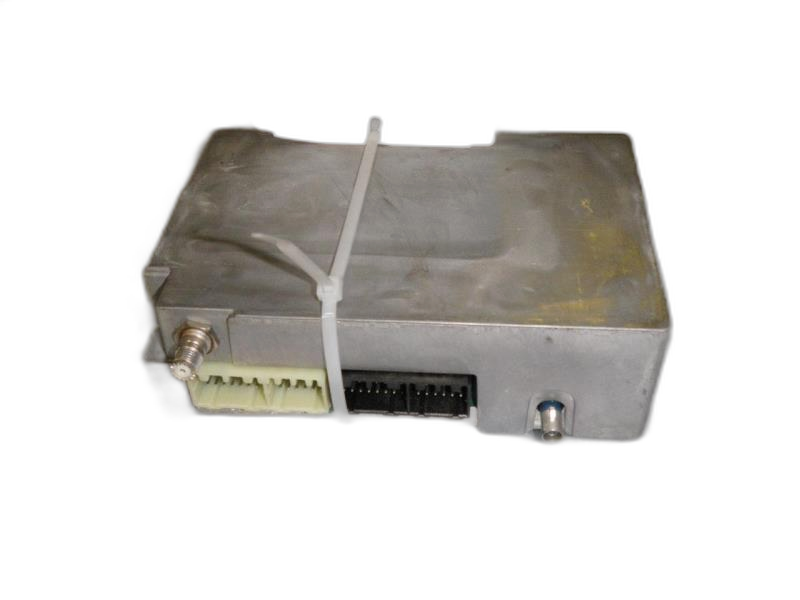
This is a used part. It is the control module for the OnStar communication system.
Fits vehicles with OnStar (option code UE1). Dealer programming is required for this part to work in your vehicle. Match your original part number exactly.
Original Part #(s): 0015600279, 10394074, 10396911, 10397558, 12451209, 12451437, 15098277, 15099972, 15795953, 15865998, 15952361, 19115461, 19115774, 22705039, 89047017
Condition: Excellent (A)
Like new, minimal to no wear
68,047 miles
Odometer reading when part was removed
SKU #
757234-21210-195
Why Buy Used OEM Parts?
✓ Quality-Verified: Every used OEM part we sell has been professionally inspected and tested to ensure it meets our quality standards. While it may show some cosmetic wear from previous use, it's fully functional and ready to install.
✓ Original Equipment: This is a genuine OEM (Original Equipment Manufacturer) part - the exact same part that came with your vehicle from the factory. It's designed specifically for your make and model, ensuring perfect fitment and performance.
✓ Works Like New: Despite some visual wear, this part will perform just as well as a brand new one. The internal components and functionality are intact, giving you the same reliability you'd expect from OEM quality.
✓ Significant Savings: Save 50-80% compared to buying new! Used OEM parts offer exceptional value - you get factory quality at a fraction of the cost. It's the smart choice for budget-conscious vehicle owners who won't compromise on quality.
✓ Risk-Free Purchase: We stand behind our used parts with a generous 6-month warranty, 30-day returns, and 100% money-back guarantee. If it doesn't work out for any reason, simply return it for a full refund. You have nothing to lose!
🛡️ 30-Day Returns + 6-Month Warranty - Buy with Confidence!
Meet Wrenchy - The Amazing Parts Assistant!Meet Wrenchy The Amazing Assistant!
Let Wrenchy help you confirm if this is the right part.
Ask Wrenchy - Type or Speak! 🎤
Wrenchy the Robot ®
Vehicle Fitment Guide
This part fits the following vehicles:
Active Filters:
⚠️ No Matching Vehicles Found
This part does not fit the vehicle specifications you selected. Please try adjusting your filter criteria or to see all compatible vehicles.
Chevrolet
Trailblazer2003-2006(tapclick to expand)(tapclick to hide)
Swipe left/right to see more info
SubmodelSUB- MODEL
Body Style
Years
Engine
Attributes
Base
SUV
2003 - 2006
L6 4.2L
RWD | Automatic | Includes EXT models
LS
SUV
2003 - 2006
L6 4.2L
RWD/4WD | Automatic | Includes EXT models
LT
SUV
2003 - 2006
L6 4.2L
RWD/4WD | Automatic | Includes EXT models
LTZ
SUV
2003
L6 4.2L
RWD/4WD | Automatic | Includes EXT models
North Face
SUV
2003 - 2004
L6 4.2L
RWD/4WD | Automatic | Includes EXT models
A
SUV
2004 - 2006
L6 4.2L
RWD | Automatic | Includes EXT models
B
SUV
2004 - 2006
L6 4.2L
RWD | Automatic | Includes EXT models
Q
SUV
2005
L6 4.2L
RWD | Automatic | Includes EXT models
R
SUV
2005
L6 4.2L
RWD | Automatic | Includes EXT models
B
SUV
2006
L6 4.2L
4WD | Automatic | Includes EXT models
LS
SUV
2006
V8 5.3L
RWD/4WD | Automatic | Includes EXT models
LT
SUV
2006
V8 5.3L
RWD/4WD | Automatic | Includes EXT models
SS
SUV
2006
V8 6.0L
AWD/RWD | Automatic | Includes EXT models
⚠️ Important: Please verify your vehicle's year, make, model, and specifications before ordering. If you're unsure about fitment, contact our customer service team for assistance.
Filter by Vehicle
Policies
Shipping & Handling
Standard shipping: 3-7 business days via UPS Ground
Parts are carefully packaged to prevent damage during transit
Returns (30 Days)
We accept returns within 30 days of delivery for this part.
Defective parts: We will replace the part or issue a refund at our discretion
Electronic parts: Must be returned with the sealed inspection bag unopened. The clear bag allows full visual inspection before opening. Once opened, electronic parts can only be exchanged for a replacement if defective — no refunds
Programming: "Needs to be programmed to my vehicle" is not a valid return reason. Many modules require dealer programming — we're happy to help connect you with resources if your dealer says it's not programmable
Return shipping: We cover return shipping as part of our 100% money-back guarantee
Parts must be returned in original packaging and unmodified condition
Poorly packaged returns that arrive damaged will not be credited
6-Month Warranty
All used parts include a 6-month warranty from the date of purchase.
If your part fails within 6 months, we will send a replacement
Refunds are only issued if we cannot provide a suitable replacement
Warranty covers defects — not installation errors, misuse, or damage after installation
Note: Warranty is for replacement, not refund. A part failing on day 80? We'll replace it. But the return window for refunds is 30 days.
Damaged in Shipping?
If your part arrives damaged:
Stop immediately — do not install the part
Keep all original packaging and boxes
Take clear photos of the damage and packaging
Contact us within 48 hours of delivery
We will handle the carrier claim. You are not responsible for shipping damage — we just need your help documenting it.
Order Cancellation
Orders can be cancelled before shipment for a full refund. Once shipped, cancellations follow our return policy.
Symptoms & Diagnosis
Warning Signs of a Failing Telematics Control Module
Loss of OnStar functionality (if equipped)
Difficulty connecting to cellular networks
GPS issues or inaccurate location data
Remote door unlock problems
Diagnostic trouble codes (DTCs) related to telematics
Testing the Telematics Control Module
If you're experiencing telematics issues, it's important to determine if the module itself is the problem. Here's how to check:
Check the vehicle's battery voltage: Low voltage can sometimes cause communication issues with the module.
Inspect the wiring and connections: Look for any signs of damage, corrosion, or loose connections at the module and related components.
Use a scan tool: A professional scan tool can read diagnostic trouble codes (DTCs) stored in the telematics module and other vehicle systems. This can help pinpoint the source of the problem.
Consult a professional: If you're unsure how to proceed, a qualified technician can perform further testing to diagnose the issue.
Common Failure Causes
Water damage or corrosion
Electrical surges or shorts
Physical damage from accidents
Software glitches or corruption
Normal wear and tear over time
Buyer's Checklist
What to Look For When Buying
Compatibility: Ensure the part is designed for your vehicle's year, make, and model.
Condition: Decide if you want a used OEM or new aftermarket part.
Warranty: Check if the part comes with a warranty.
Reputation: Research the seller's reputation and return policy.
Quality Indicators
| Feature | Used OEM be tested and inspected.
| | YOU ARE WRITING SEO CONTENT FOR A SPECIFIC AUTO PART PRODUCT PAGE. THE PRODUCT IS:
OEM Telematics Control Module for 2002-2009 Buick, Chevrolet, GMC, Isuzu, Oldsmobile, Pontiac, & Saab
Warning Signs of a Failing Telematics Control Module
Loss of OnStar service (if equipped)
Unable to remotely lock or unlock doors using your phone app
GPS navigation system not working correctly
Difficulty connecting to emergency services through the vehicle
Warning lights on the dashboard related to the telematics system
Testing the Telematics Control Module
Before replacing the telematics control module, it's important to rule out other potential causes. Here's how you can test:
Check the vehicle's battery: A weak battery can cause communication problems with the module. Make sure your battery is fully charged and in good condition.
Inspect the wiring: Look for any damaged, corroded, or loose wires connected to the telematics module.
Check the antenna: The telematics module relies on an antenna to communicate with cellular networks and GPS satellites. Make sure the antenna is properly connected and not damaged.
Use a scan tool: A mechanic can use a scan tool to check for diagnostic trouble codes (DTCs) related to the telematics system.
Consult a professional: If you're not comfortable performing these tests yourself, take your vehicle to a qualified mechanic.
Common Failure Causes
Water damage
Corrosion
Electrical surges
Physical damage from an accident
Old age and wear and tear
Buyer's Checklist
What to Look For When Buying
Compatibility: Make sure the module is compatible with your vehicle's year, make, and model.
Condition: Decide whether you want a used OEM or a new aftermarket module.
Warranty: Check if the module comes with a warranty.
Seller Reputation: Buy from a reputable seller with good reviews.
Quality Indicators
| Feature | Used OEM THE PRODUCT IS:
OEM Telematics Control Module for 2002-2009 Buick, Chevrolet, GMC, Isuzu, Oldsmobile, Pontiac, & Saab